|
|
|
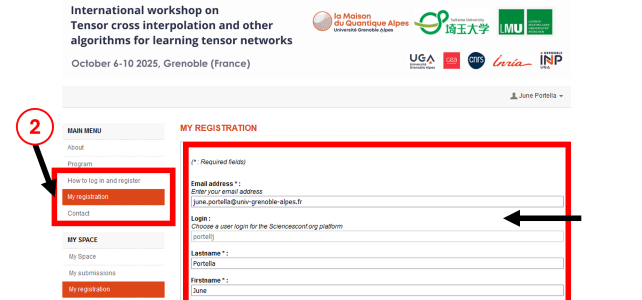
How to log in and registerIf you want to register for the workshop, you need to follow these three steps: 1 - Log into your scienceconf account 2 - Complete the registration form by clicking on the "My registration" button 3 - Submit your abstract by clicking ont the "My submissions" button
⬇️ You will find the detailed steps bellow ⬇️
1 - HOW TO LOG IN?
To register for a conference website created on the sciencesconf.org platform, you have two cases:
b. You do not have an account:
For any questions regarding the creation of a sciencesconf account, please contact: contact@sciencesconf.org
2 - COMPLETE THE REGISTRATION FORM:
a. Once logged into the platform, click on the "My registration" button on the left b. Fill the registration form. You can also check this scienceconf tutoriel: Access the registration form
3 - HOW TO SUBMIT YOUR ABSTRACT: a. Click on the "submit an abstract" button. b. Choose the reason why you submit the abstrat: oral, poster or attendance. You can choose only one submission. You can also check this scienceconf tutoriel: Make a new submission
*** For any inquiries specifically related to conference registration, you may contact the administrators directly with the following e-mail address: june.portella@univ-grenoble-alpes.fr.
|